
Lumiric Stage
Create musical content with real-time MIDI visualization, Magic Piano, Floating Labels, built-in camera support, and cinematic Stages. Designed for creators, pianists, educators, and streamers.


このゲームについて
Lumiric Stage
Turn MIDI files and live performances into visual content.
Lumiric Stage is a real-time MIDI visualization and music content creation tool designed for creators, pianists, educators, and streamers.
Create piano videos, tutorials, livestreams, educational content, and cinematic performances using Magic Piano, Floating Labels, built-in camera support, customizable note visuals, and immersive real-time Stages.
This is not just a piano roll.
This is a stage.
Built for Music Content Creators
Most MIDI visualization workflows require multiple tools, video editing software, perspective correction, and manual synchronization between video and MIDI data.
Lumiric Stage was designed to simplify that process.
With built-in camera support, Magic Piano calibration, Floating Labels, and Falling Notes Video Sync, you can create educational videos, piano performances, livestreams, and social media content directly inside a single application.
Whether you want to teach, perform, stream, or grow your music content, Lumiric Stage helps turn your playing into something people can see, follow, and remember.
Magic Piano
Have you ever seen those “Magic Piano” videos where visual notes align perfectly with a real piano?
Creating that effect usually requires recording MIDI, recording video, aligning both sources, correcting perspective, syncing everything manually, and finishing the result in editing software.
Lumiric Stage makes this workflow much simpler.
With Magic Piano, you only need to place three calibration handles on your real piano: the lowest note, middle C (C4), and the highest note. Lumiric Stage uses these points to align visual effects directly to your camera view, regardless of piano size or camera angle.
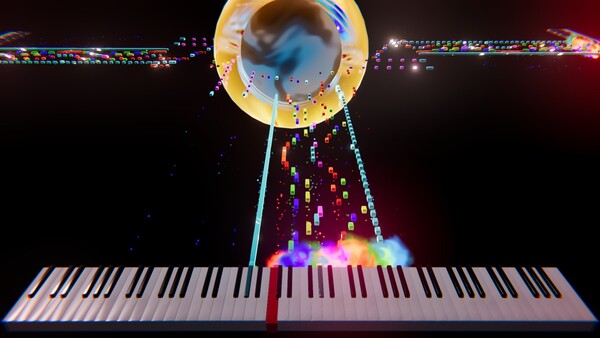
Combined with Falling Notes Video Sync, notes can travel toward the piano and arrive exactly when the video shows you pressing the key. This makes it possible to create tutorials, performances, and livestreams with falling-note visuals without doing the synchronization later in post-production.
Floating Labels
Floating Labels display musical notation directly on the visual notes, making your performances easier to follow, teach, and share.
Choose between International notation, Solfège, or Nashville numbers, then customize the label size, text, background, colors, and animation behavior.
Label colors can be fixed or dynamically generated using modes such as Follow Note, Follow Piano, Complementary, or Analogous, helping your content stay readable and visually cohesive.
Used together with Magic Piano, Floating Labels can turn a real piano performance into a clear educational video, tutorial, or livestream where viewers can see not only what is being played, but also understand the notes behind the music.
Music Guide
Lumiric Stage includes Music Guide tools designed to help creators, students, and educators visualize music more clearly.
Choose a key, scale, and notation system, then display labels on the piano or directly on the moving notes. You can use scale-aware visualization, degree-based coloring, and out-of-scale feedback to make musical structure easier to see.
Whether you are explaining chords, practicing a difficult passage, or creating educational content, Music Guide helps transform music theory into something visual and immediate.
Note Coloring
Lumiric Stage lets you define how notes are colored across the entire performance.
Use simple coloring modes such as MIDI Channel, individual Note, or Velocity, or switch to Degree-based coloring when working with a selected key and scale.
Degree coloring makes harmonic relationships easier to see by assigning colors based on each note’s musical role inside the scale. This can be especially useful for tutorials, music theory explanations, improvisation practice, and educational videos.
Notes outside the selected scale can also be visually separated, helping viewers immediately identify notes that do not belong to the current musical context.
Combined with Floating Labels and Music Guide, Note Coloring turns MIDI visualization into a clearer and more educational visual language, while still allowing creators to build their own unique aesthetic style.
Playback and Note Flow
Lumiric Stage gives you control over how notes move through the scene.
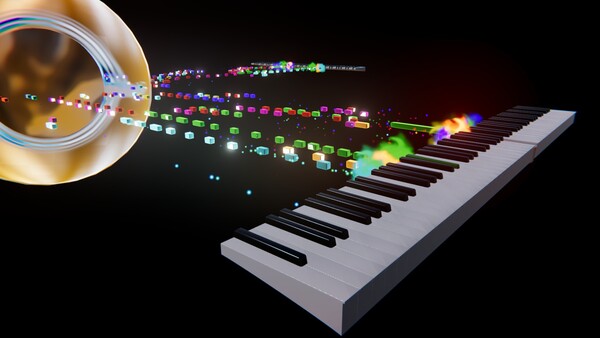
Use Note Flow to switch between Incoming (Falling Notes) and Outgoing (Default Mode). Incoming mode creates the classic falling-note style used for tutorials and learning workflows, while Outgoing mode lets notes emerge from the instrument for a more cinematic performance look.
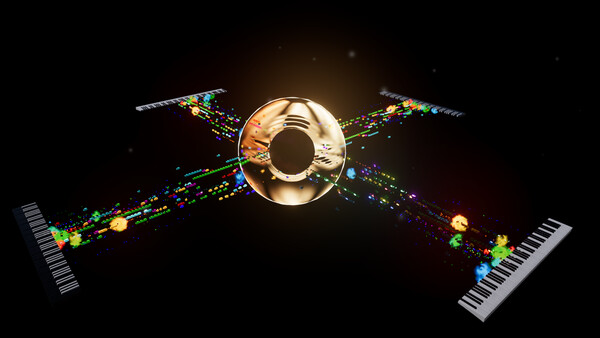
Unlike traditional visualizers that mainly send notes upward or forward, Lumiric Stage lets you rotate note paths in 360 degrees using Path Angle. This makes it possible to direct notes toward the camera, across the stage, behind a performer, or into cinematic stage elements.
Travel Time controls how long notes take to move along their path, while MIDI Speed lets you slow down or speed up MIDI file playback. This makes it easier to study difficult songs at half speed, especially when combined with Floating Labels that show the note names before they reach the piano.
MIDI Player
At its core, Lumiric Stage can also be used as a MIDI music player.
Load MIDI files and SoundFont (.sf2) files, listen to your music, and watch each performance become a visual scene in real time.
This makes Lumiric Stage useful not only for creating videos and livestreams, but also for simply enjoying your favorite MIDI performances with custom instruments, colors, stages, and visual effects.
Smart Playlist
Lumiric Stage includes a playlist system for users who want to listen, watch, or loop their favorite MIDI performances.
When you favorite a song, Lumiric Stage saves more than just the MIDI file. It can also preserve the selected SoundFont, Stage, visual settings, and performance configuration used with that song.
This means each favorite becomes a complete performance preset: the music, the sound, and the visual identity are kept together.
Stages
Stages define the visual environment where your music comes to life.
Void is a clean, minimal Stage designed for clarity, learning, streaming, Magic Piano, and Floating Labels. It keeps the focus on the instrument, the notes, and the viewer’s understanding of the performance.
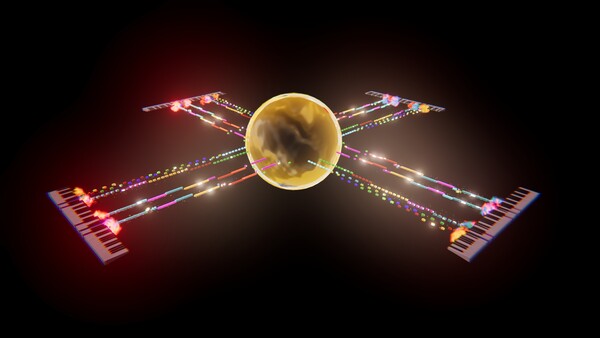
Singularity is a cinematic Stage built around a dramatic black-hole-inspired core. It is designed for more expressive performances, sci-fi visuals, multi-performer setups, and showcase videos.
Choose a clean setup for tutorials and livestreams, or a cinematic environment when you want the music to feel like a visual performance.
Post-Processing
Lumiric Stage includes a post-processing system that helps shape the final look of your performance.
Effects such as Vignette, Chromatic Aberration, Bloom, Lens effects, and other visual treatments can be adjusted independently.
Post-processing can also react to the intensity of the music. For example, Chromatic Aberration can remain subtle during quiet moments and become stronger when the music intensifies, creating psychedelic or cinematic reactions driven by the performance itself.
Each effect can be configured separately, giving creators control over the atmosphere, energy, and visual identity of their videos.
Customization
Customize the visual identity of each performance.
Adjust note colors, note shapes, note skins, note paths, instruments, channels, stage settings, Floating Labels, post-processing, and playback behavior.
Color systems can follow MIDI channels, individual notes, velocity, or musical degree when a scale is selected, allowing both creative and educational visualization styles.
Lumiric Stage is not only about watching MIDI notes move. It is about shaping how music is presented.
Future Stages
Lumiric Stage is designed to grow with new Stages and visual worlds over time.
Future Stages may explore more atmospheric and cinematic environments, including organic worlds where creatures such as Lumiflies interact with the scene, orbit trees, follow note paths, and react to the music.
As Lumiric Stage evolves, additional Stages may be introduced as free updates, premium content, or DLC depending on scope and production requirements.
Current Focus
Lumiric Stage is currently focused on creator workflows, piano content, streaming, visual learning, and real-time MIDI visualization.
The goal is to make it easier for musicians and creators to produce content that is beautiful, understandable, and ready to share.
Load your music.
Shape the visuals.
Create the performance.